
At ReachOwl, we help you manage your social media smarter. Over time, your Instagram following list can become cluttered with inactive or irrelevant accounts that don’t contribute to your growth.
That’s why we introduced the Unfollow Audience feature a simple and powerful way to clean your following and improve your account performance.
Why You Should Clean Your Instagram Following
Keeping a large but irrelevant following list can hurt your engagement and overall account quality. With the right cleanup strategy, you can:
- Remove inactive or non-engaging accounts
- Improve your engagement rate
- Stay focused on your niche audience
- Make your profile more valuable and targeted
How ReachOwl’s Instagram Unfollow Tool Works
ReachOwl automates the unfollowing process while keeping everything safe and under your control.
1. Apply Bio Keyword Filters
ReachOwl scans the accounts you follow and identifies profiles based on keywords in their bio (e.g., crypto, business, agency).
2. Exclude Important Accounts
Add keywords like client, team, friend to avoid unfollowing valuable connections.
3. Scan Matching Profiles
The system finds accounts that match your selected filters.
4. Automated Unfollowing
ReachOwl gradually unfollows selected accounts based on your daily limits, ensuring safe automation.
Key Benefits of Using ReachOwl
✅ Declutter Your Following List
Keep your Instagram clean and relevant.
✅ Boost Engagement
Focus on users who actually interact with your content.
✅ Stay Niche-Focused
Maintain a targeted audience aligned with your business or brand.
✅ Save Time
Avoid manual unfollowing and automate the entire process.
How to Create an Instagram Unfollow Campaign
Follow these simple steps to start cleaning your Instagram account:
Step 1: Go to Campaigns
- Log in to your ReachOwl dashboard
- Click on Campaigns from the sidebar
- Click Create New Campaign
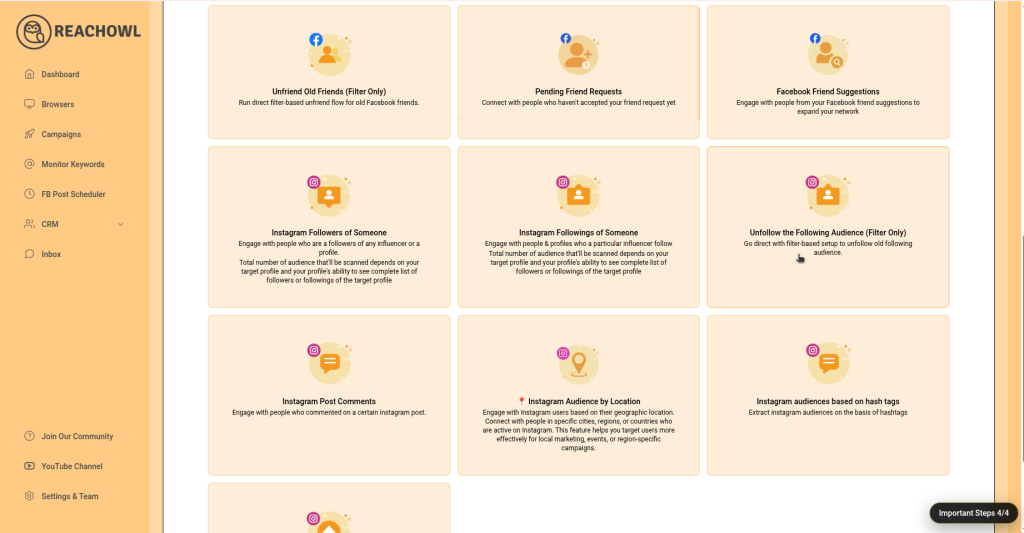
Step 2: Select any Instagram prospects
- Complete the next process paste URL
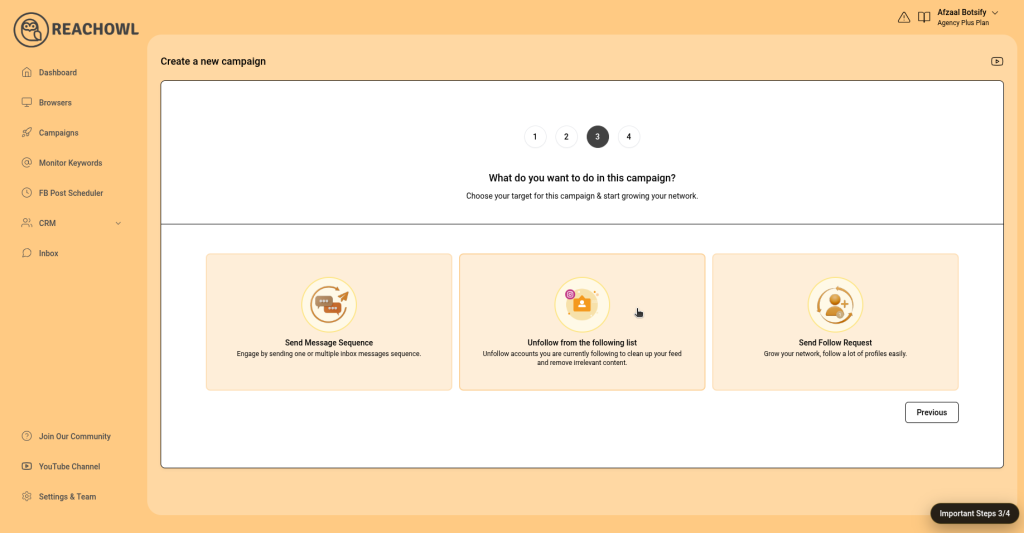
Step 3: Click on Unfollow From The Following List
- This will go to filter page
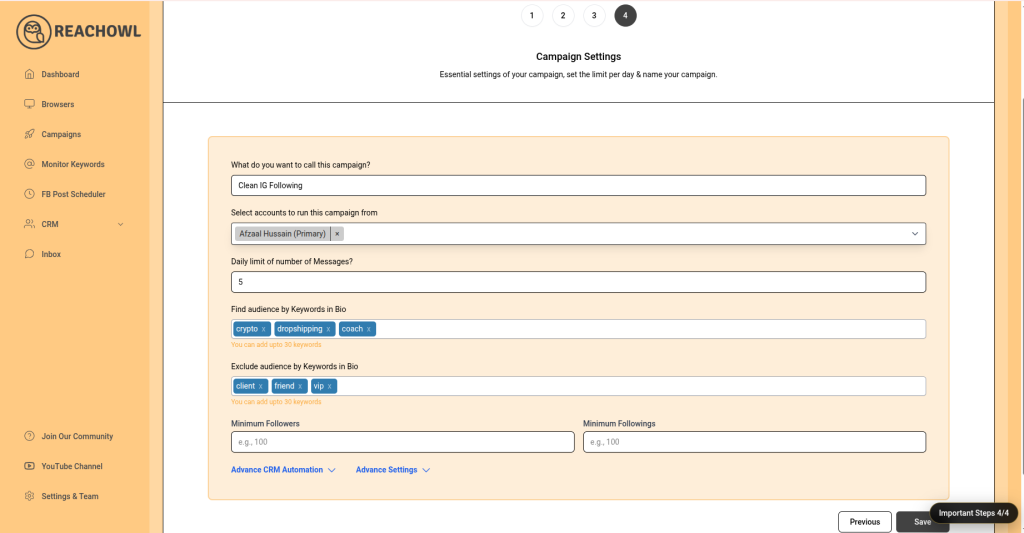
Step 4: Configure Campaign Settings
- Campaign Name: Example – Clean IG Following
- Select Account: Choose your Instagram account
- Daily Limit: Start with 5–10 unfollows per day
Step 5: Use Smart Filters
Refine your targeting with keyword filters:
- Find Audience by Keywords in Bio
Example: crypto, dropshipping, coach - Exclude Audience by Keywords
Example: client, friend, vip
👉 You can add up to 30 keywords for better precision.
Step 6: Launch the Campaign
- Click Save
- ReachOwl will begin scanning your following list
- Data collection may take a few minutes
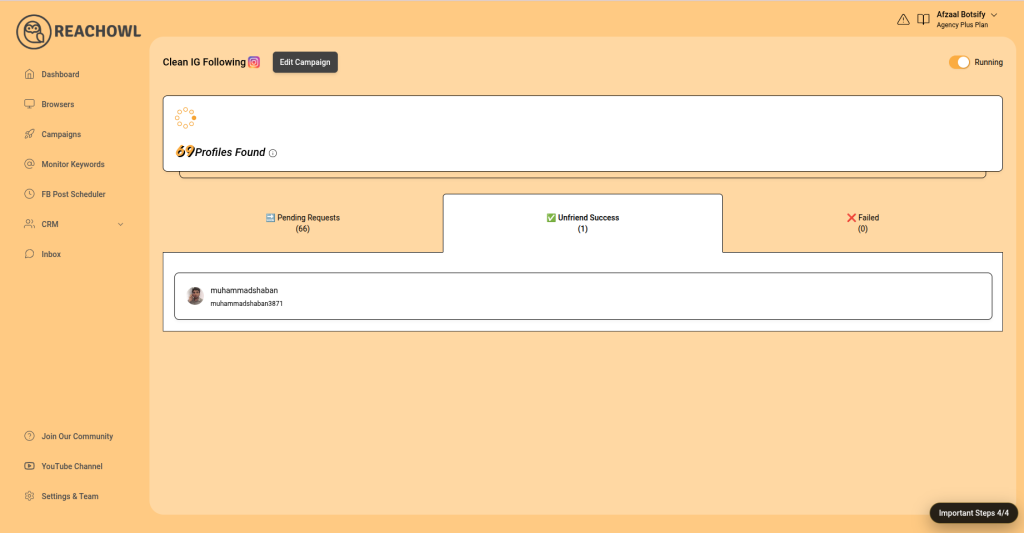
Step 7: Monitor Campaign Results
Track your campaign performance easily:
- Profiles found
- Unfollowed successfully
- Pending actions
- Failed attempts
Best Practices for Safe Instagram Unfollowing
To get the best results while staying safe:
- Start with a low daily limit
- Always double-check your filters
- Run campaigns regularly instead of all at once
- Keep your activity natural and consistent
Final Thoughts
Managing your Instagram following doesn’t have to be time-consuming.
With ReachOwl’s Instagram Unfollow Tool, you can automate the cleanup process, improve engagement, and maintain a high-quality audience—all while staying in full control.
👉 Start using ReachOwl today and build a cleaner, more focused Instagram presence.