
Facebook comments are more than simple engagement.
For businesses, creators, agencies, and marketers, a comment can be the beginning of a valuable customer conversation.
Someone might comment:
- “Price?”
- “Interested”
- “Send details”
- “How does this work?”
- “Can you explain?”
- “DM me”
The problem is that manually monitoring Facebook posts, checking every new comment, replying publicly, and then messaging interested people privately can quickly become repetitive.
Important opportunities can also be missed when your team is busy or away from Facebook.
That is where Facebook Post Comment Automation in ReachOwl can help.
ReachOwl lets you monitor selected Facebook posts for specific keywords. When a new comment matches one of those keywords, ReachOwl can automatically post a public comment reply and send the commenter a private Facebook DM.
This creates a simple automated workflow:
Facebook Post → Comment → Keyword Match → Public Reply → Private DM → Conversation
What Is Facebook Post Comment Automation?
Facebook Post Comment Automation allows you to monitor comments on selected Facebook posts and automatically respond when a comment contains one of your configured keywords.
For example, imagine you publish:
“Want to learn more about ReachOwl? Comment INFO below.”
Instead of manually checking the post throughout the day, you can configure ReachOwl to monitor that post.
When somebody comments:
“INFO”
or uses another keyword you have configured, ReachOwl can automatically:
- Post a public reply under their comment.
- Send them a private Facebook message.
That lets you acknowledge the person publicly while moving the actual conversation into Messenger.
Complete Facebook Comment Automation Workflow
Once everything is configured, the process works like this:
1. Someone comments on your monitored Facebook post
↓
2. ReachOwl checks the comment
↓
3. ReachOwl looks for one of your configured keywords
↓
4. A matching keyword is detected
↓
5. ReachOwl posts your configured public reply
↓
6. ReachOwl sends your configured private DM
↓
7. The conversation can continue inside Messenger
This turns a simple Facebook comment into the beginning of a structured lead-generation process.
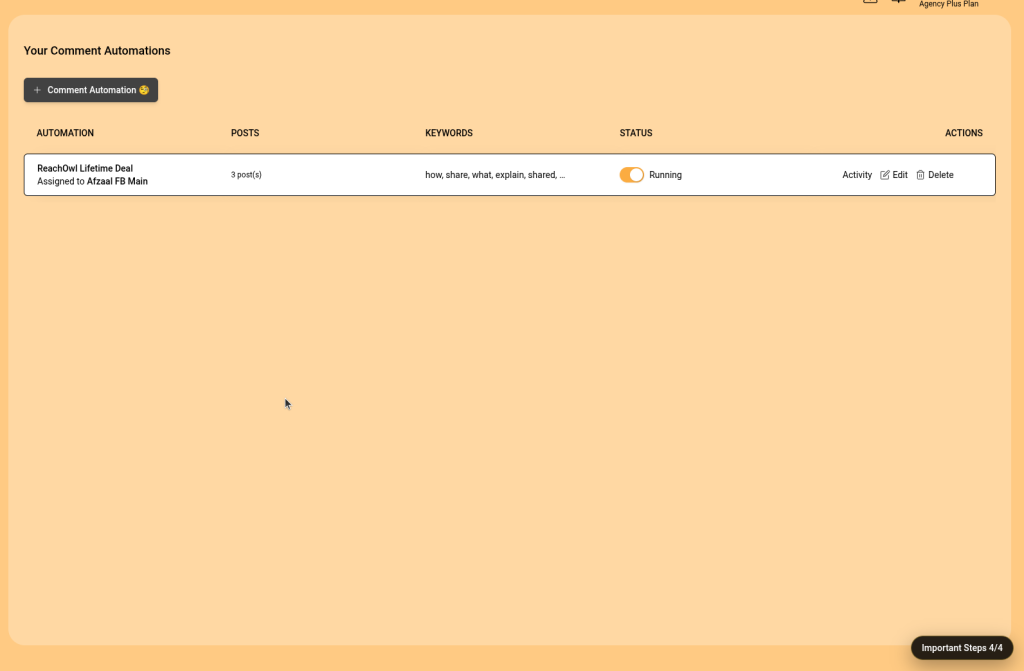
Example Facebook Post Comment Automation Campaign
Imagine you publish this post:
Want to automate your Facebook and Instagram outreach?
Comment INFO below and I’ll send you the details.
You could configure ReachOwl like this:
| Setting | Example |
|---|---|
| Facebook account | Your connected business/profile account |
| Facebook post | Promotional post URL |
| Keywords | INFO, DETAILS, INTERESTED, HOW |
| Public reply | “Thanks! I’ve sent you the details privately 👋” |
| Private DM | Product information + relevant link |
| Status | Running |
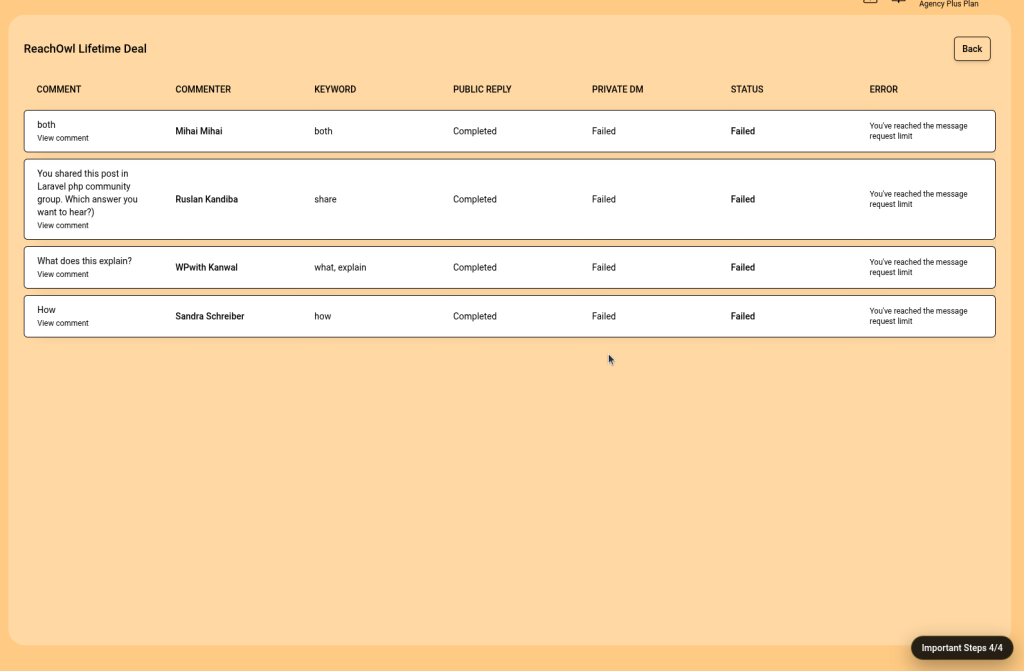
Someone then comments:
“Interested, can you send details?”
ReachOwl detects interested or details, publishes the public reply, and sends your configured private message.
No manual monitoring is required for that first interaction.
Why Automate Facebook Comments?
1. Respond Faster
Social media conversations move quickly.
Someone who is interested now may lose interest later.
By automatically detecting relevant comments, you can begin the conversation sooner instead of waiting until someone on your team manually checks Facebook.
2. Capture High-Intent Leads
Comments such as:
- “Price?”
- “How?”
- “Interested”
- “Send details”
- “Can I get a demo?”
often indicate considerably more intent than a simple like or reaction.
Keyword-based automation helps identify those comments and automatically move the person toward the next step.
3. Reduce Repetitive Work
Without automation, your workflow may look like this:
Open Facebook → Check post → Read comments → Identify interested person → Reply → Open Messenger → Send message → Repeat
With ReachOwl, much of that first-contact process can happen automatically.
Your team can then focus on people who reply or require a genuine human conversation.
4. Move Conversations Into Messenger
Public comments are useful for engagement, but Messenger is usually better for detailed conversations.
ReachOwl lets you combine both.
The public reply acknowledges the user.
The private DM moves the conversation somewhere better suited to:
- Answering questions
- Sharing details
- Qualifying leads
- Sending relevant links
- Discussing pricing
- Booking calls
Facebook Post Comment Automation Use Cases
Product Promotions
Create a post such as:
“Want to see how it works? Comment DETAILS.”
ReachOwl can detect the keyword and send the next response automatically.
Agencies and Consultants
A consultant might post:
“Want a free consultation? Comment CALL below.”
Possible keywords:
call, consultation, interested, details
The automation can acknowledge the comment and continue privately.
Lead Magnets
Promoting a guide, checklist, or template?
Post:
“Comment GUIDE and I’ll send it over.”
Configure GUIDE as the trigger and deliver the next step through the private DM.
Webinar and Event Promotion
For example:
“Want to join our next webinar? Comment REGISTER.”
Your trigger keywords might include:
register, webinar, join, event
Promotions and Giveaways
For a promotion:
“Comment JOIN if you want to participate.”
ReachOwl can detect those comments and automate the first response.
Facebook Post Comment Automation for Agencies
This feature can be particularly useful for agencies managing multiple campaigns.
Instead of manually monitoring different client posts, agencies can create separate automations.
For example:
Client A
Post: Product promotion
Keyword: PRICE
Response: Pricing conversation
Client B
Post: Lead magnet
Keyword: GUIDE
Response: Resource delivery
Client C
Post: Consultation offer
Keyword: DEMO
Response: Demo conversation
Each automation can have its own:
- Facebook account
- Facebook posts
- Keywords
- Public response
- Private message
That makes campaigns easier to manage and keeps responses relevant to each client’s offer.
Best Practices for ReachOwl Facebook Post Comment Automation
Use Natural Keywords
Do not rely on only one exact keyword.
If the call to action is:
“Comment INFO”
people may actually write:
“Can I have more info?”
“Interested”
“Please send details.”
Consider adding several words that represent the same intent.
Keep Public Replies Short
The public response should mainly acknowledge the commenter.
Good:
“Thanks! I’ve sent you the details privately 😊”
Less effective:
A long promotional paragraph containing pricing, links, benefits, and multiple calls to action.
Move detailed information into the private DM instead.
Match the DM to the Keyword
If someone comments PRICE, send pricing-related information.
If someone comments GUIDE, send information about the guide.
If someone comments DEMO, move them toward the demo process.
Relevant responses make the automation feel much more natural.
Don’t Over-Automate the Conversation
Automation is useful for starting conversations and handling repetitive first steps.
It should not replace genuine conversations when a prospect needs help.
A good strategy is:
Automation starts the conversation → Human takes over when needed
Create Separate Automations for Different Offers
Avoid using one generic response for every Facebook post.
A campaign promoting a webinar should have a different response from a campaign promoting pricing.
Separate automations make reporting, editing, and managing campaigns easier.
From Facebook Comment to Lead
The biggest benefit of Facebook Comment Automation is not simply replying faster.
It is creating a repeatable process for turning engagement into conversations.
Without automation:
Post → Comment → Hopefully someone notices it
With ReachOwl:
Post → Comment → Keyword Detection → Public Reply → Private DM → Conversation → Lead
ReachOwl already brings Facebook and Instagram outreach into a centralized workflow, allowing teams to manage campaigns and lead conversations instead of relying entirely on manual social media activity.
Turn Facebook Comments Into Opportunities with ReachOwl
A Facebook comment can be much more than an engagement metric using Facebook Post Comment Automation.
It can be a customer asking about pricing.
A prospect requesting information.
Someone interested in your service.
A person looking for a demo.
Or the beginning of your next sales conversation.
With ReachOwl Facebook Post Comment Automation, you can monitor selected Facebook posts, identify comments containing relevant keywords, automatically respond publicly, and continue the conversation through a private message.
The process is simple:
Select Account → Add Posts → Add Keywords → Public Reply → Private DM → Activate
Instead of manually monitoring every comment, ReachOwl helps you create a repeatable workflow for turning Facebook engagement into meaningful conversations.
Explore More ReachOwl Features
If you’re looking to automate more of your social media outreach, explore other ReachOwl features for Facebook and Instagram automation, lead generation, campaign management, and social engagement.
- Facebook Comment Automation – Automatically respond to relevant comments and start private conversations.
- Facebook & Instagram Outreach – Automate outreach campaigns and connect with potential leads.
- Keyword Monitoring – Monitor relevant keywords and discover new opportunities.
- Post Scheduling – Schedule Facebook and Instagram posts from your ReachOwl workflow.
- ReachOwl API & Developer Tools – Connect ReachOwl with your own applications and automation workflows.
- ReachOwl MCP for AI Agents – Connect AI clients such as Cursor, Claude, and ChatGPT with ReachOwl to manage campaigns, leads, and social automation.
For more information about integrating ReachOwl with AI-powered workflows, visit the ReachOwl MCP Server on Smithery or explore the ReachOwl Developer Documentation.
Get Started with Facebook Comment Automation
Ready to turn Facebook comments into conversations?
Explore ReachOwl and start building smarter Facebook outreach workflows.
You can also learn more about ReachOwl through our Facebook page, Instagram, and YouTube channel for product updates, tutorials, and automation tips.