


No cookie storage
We don’t keep your social account cookies on our servers.
Lifetime Deal! Pay Once, Use Forever
Automate outreach across Facebook, Instagram, and WhatsApp messaging from your real browser session, so you send more messages, get more replies, and fill calendars.
Secure checkout · Lifetime updates included · Use on alt accounts for safest outreach
Stop renting outreach tools at $29–$99/mo. Own ReachOwl for life with a single payment.
Lock In Lifetime Access From $99Risk-free with our 14-Day Money Back Guarantee
Used by growth teams and agencies at companies like




ReachOwl gives you everything you need, without the hassle and high monthly fees.
Browser-Based Security
ReachOwl is a browser extension, not a cloud bot. Automation runs locally in your browser, so your Facebook, Instagram, and WhatsApp sessions stay with you. We don’t store your cookies, and we don’t share your login sessions with external servers.
Most cloud tools fail because they operate outside the user’s real browser session.
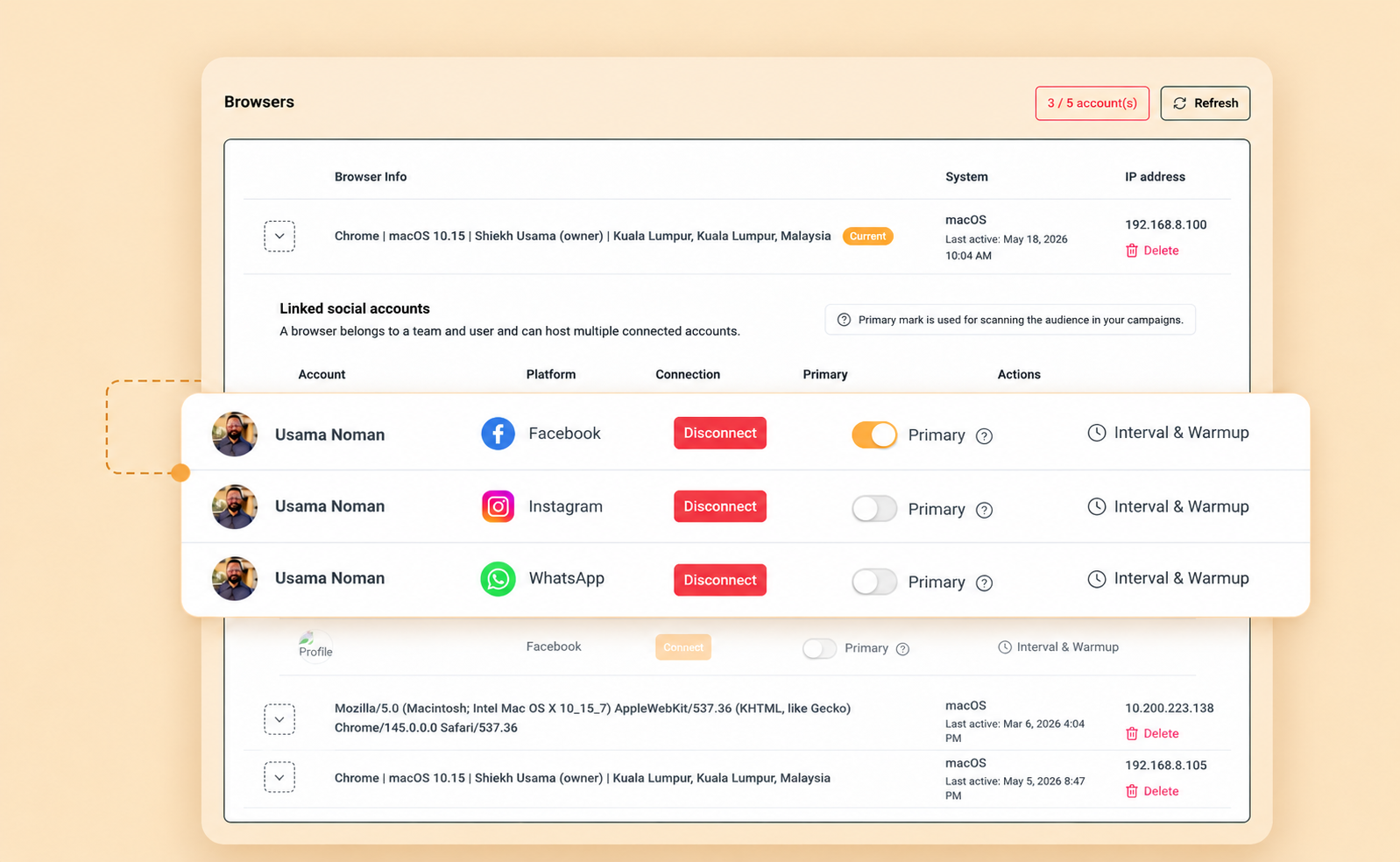
We don’t keep your social account cookies on our servers.
Your login session never gets uploaded to a shared cloud environment.
Outreach actions run inside your own browser — the way you already use social platforms.
Campaigns and sequences stay tied to your workspace — not exposed on third-party infrastructure.
Agency DMs and lead threads remain under your control, with less third-party access risk.
You decide when automation runs, which accounts to use, and when to pause — always in your hands.
ReachOwl
Traditional cloud tools
Built for agencies and businesses that prioritize account safety, privacy, and long-term outreach stability — without handing your social logins to the cloud.
Lead gen agencies and founders use ReachOwl to fill calendars from social DMs, see what they’re saying before you lock in lifetime access.

Faster outreach without risking accounts
Secure, browser-based setup that made daily outreach much more effective.
Jessica Ezell
Bussiness Developer, Ezell Digital Group

Booked more calls for our agency clients
Easy to use even if you are not technical. Everything we need for lead gen in one tool.
Alamin Islam
CEO, FindAnyLead

80+ extra calls in just one week
ReachOwl makes social media outreach feel natural and easy. It helped me build relationships with my audience and grow my business.
Mariana
Manager, EcomRolodex

Saved 20+ hours per week on outreach
ReachOwl handles my entire DM process. I no longer waste time on repetitive messaging and can focus on scaling my business.
Marcelo Bacchi
CEO, Olivialobell International

45+ direct booking inquiries in one month
ReachOwl helped us automate our social media outreach and respond faster to potential guests. Within a month, we saw a steady flow of direct booking inquiries without manual messaging.
Michael Wesley
Founder, Wesley Rentals
Agencies, coaches, and lead gen teams use ReachOwl for Facebook, Instagram, and WhatsApp messaging to turn conversations into booked calls—without hiring more setters.
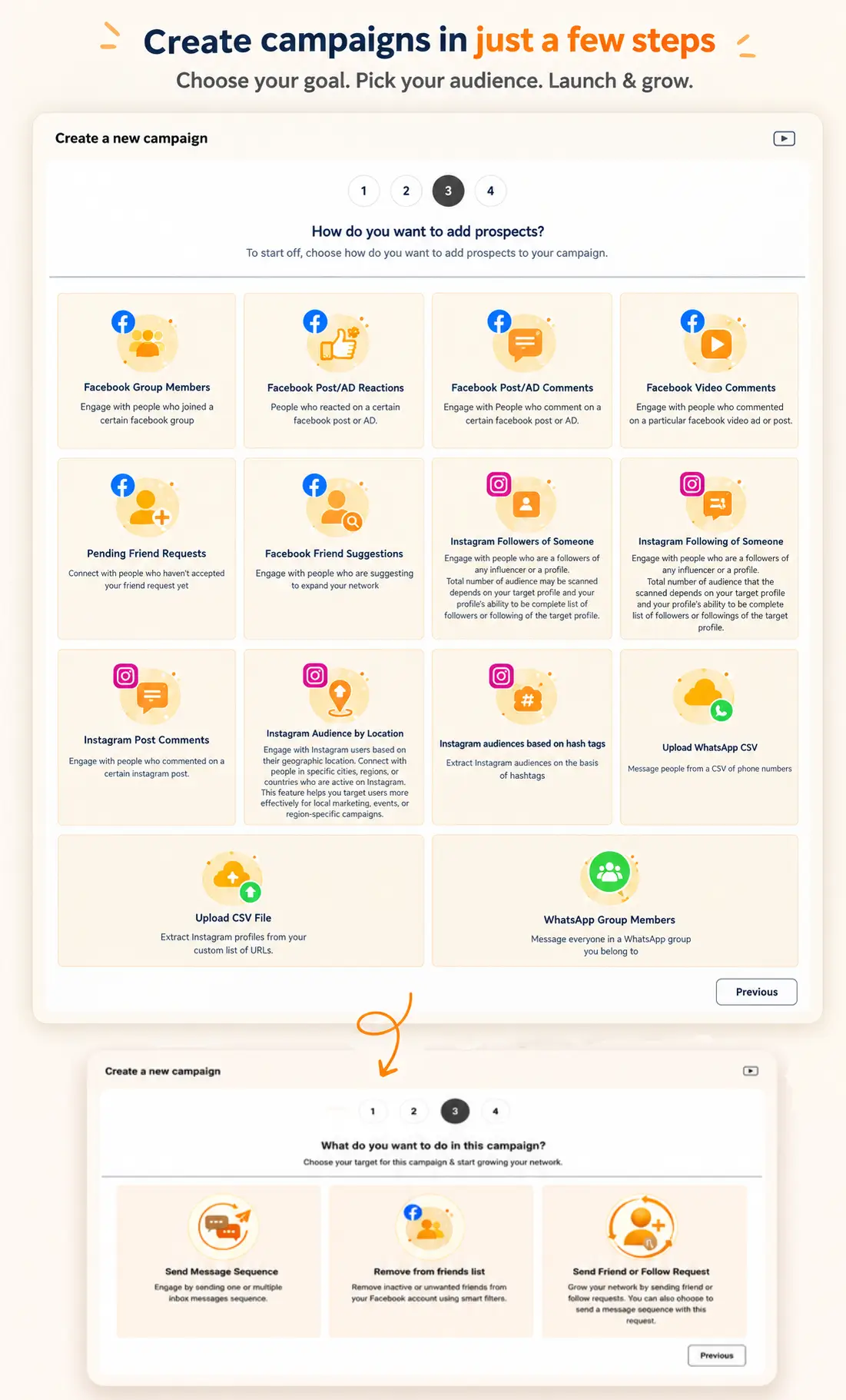
If your outreach still depends on manually sending messages, tracking replies, and chasing follow-ups, your team spends more time managing conversations than closing deals. ReachOwl campaigns automate Facebook, Instagram, and WhatsApp messaging in the background so you can generate replies and keep your pipeline active.
Find leads from groups, comments, followers, WhatsApp contacts, and CSV lists.
Run Facebook, Instagram, and WhatsApp messaging campaigns with human-like pacing.
Run campaigns safely inside your browser with smart limits and controls.
One ReachOwl workspace for social messaging campaigns—connected through your browser.
Connect WhatsApp from Browsers, then run the same campaign workflow you already use for Facebook and Instagram.
Message members of WhatsApp groups your connected account can access.
Upload phone contacts via CSV and run WhatsApp messaging campaigns against that list.
Create WhatsApp campaigns from Campaigns—same pacing, queues, and monitoring.
Activate WhatsApp on the Browsers page and keep WhatsApp Web logged in while campaigns run.
Plan content once, then publish to account timelines and Facebook groups across multiple accounts—with variations and timing controls, included in your lifetime deal.
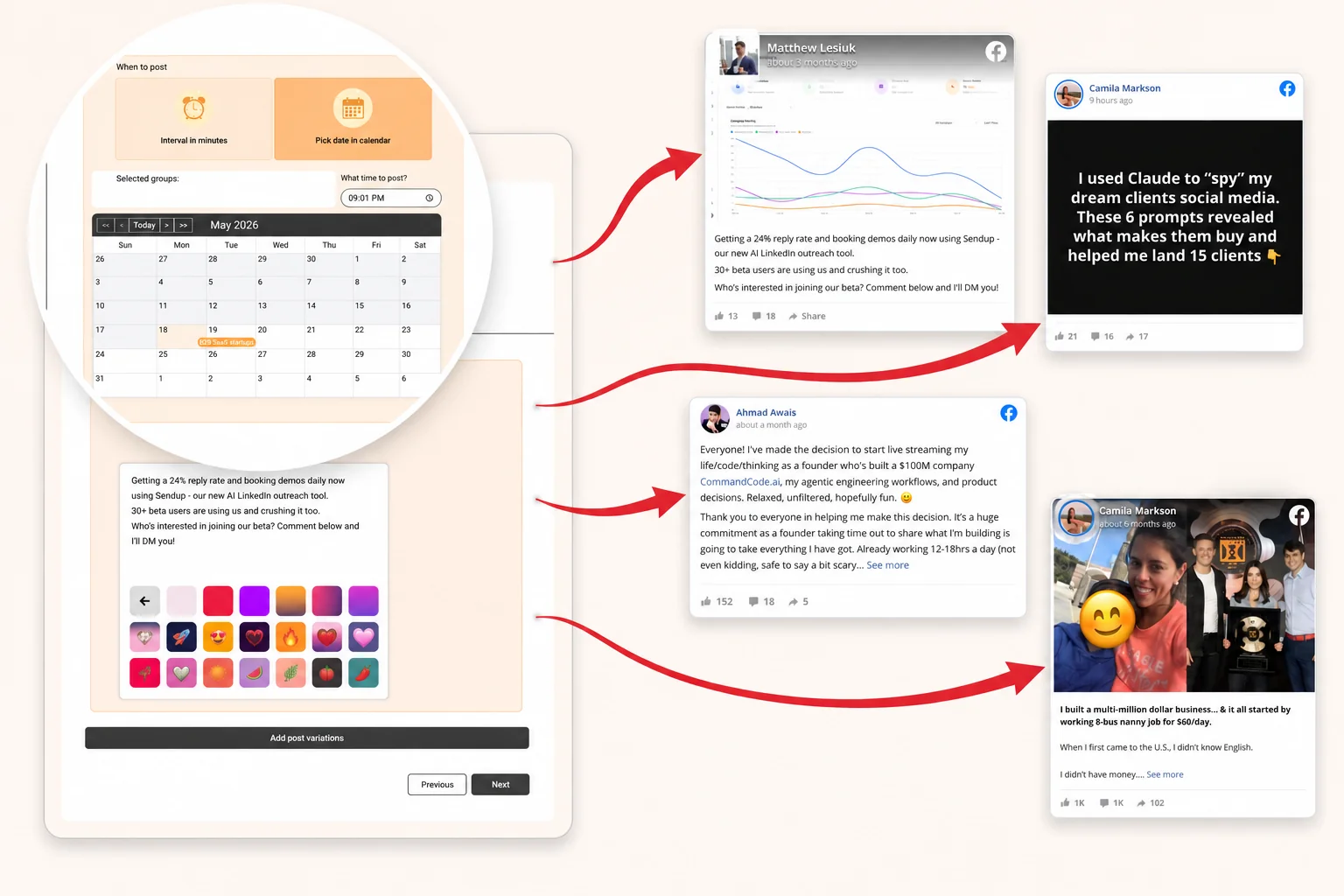
Images, backgrounds, and copy: like posting on Facebook.
Post to account timelines and groups across multiple Facebook accounts.
Rotate unique versions so every destination gets fresh content.
Time intervals or calendar dates, preview before publish.
One inbox for every conversation, tag, assign, and follow up so interested prospects don’t go cold.
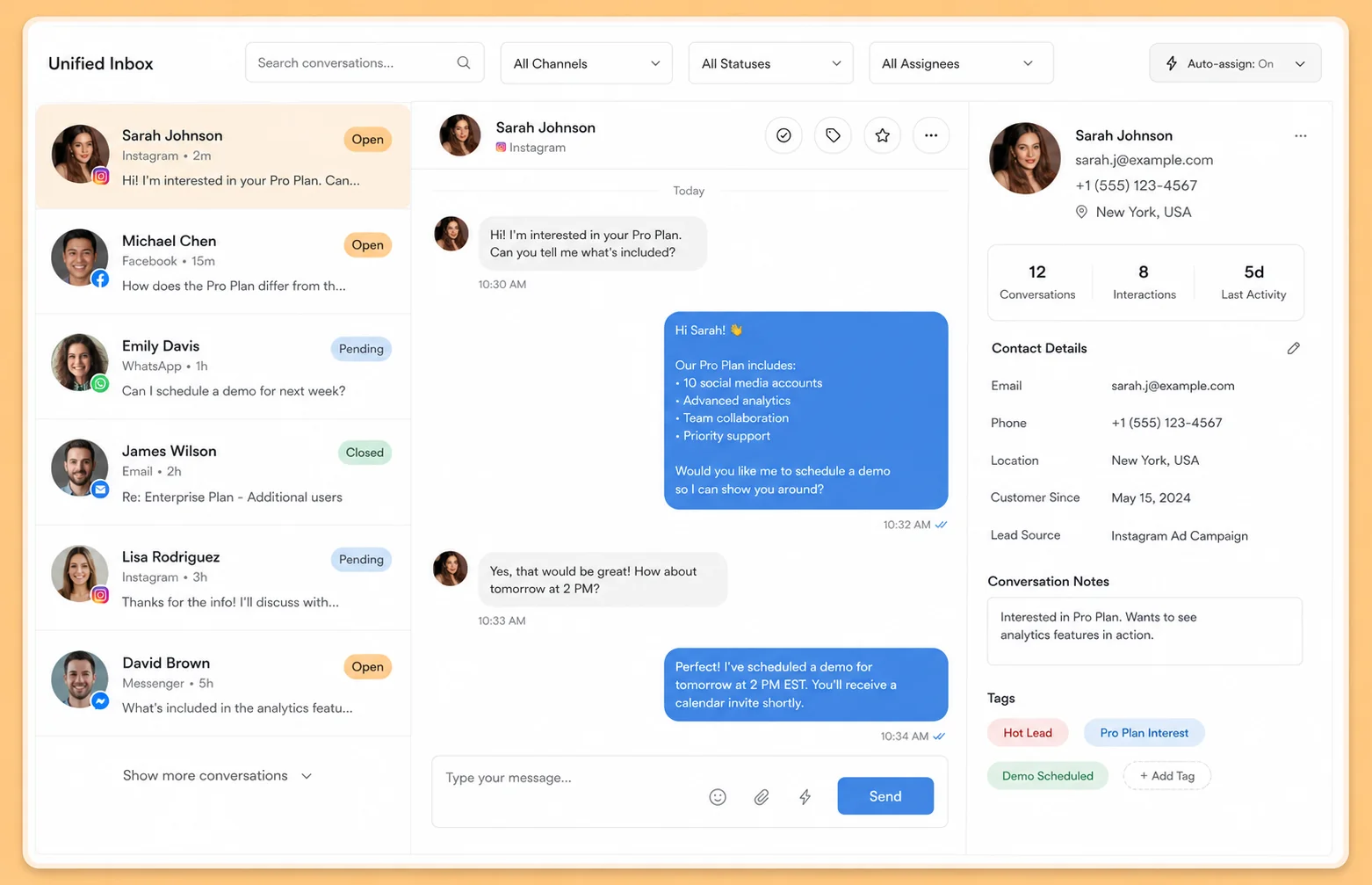
Multi-step message sequences nurture leads while you sleep—including Facebook, Instagram, and WhatsApp messaging campaigns—so you stop losing deals to “forgot to follow up.”
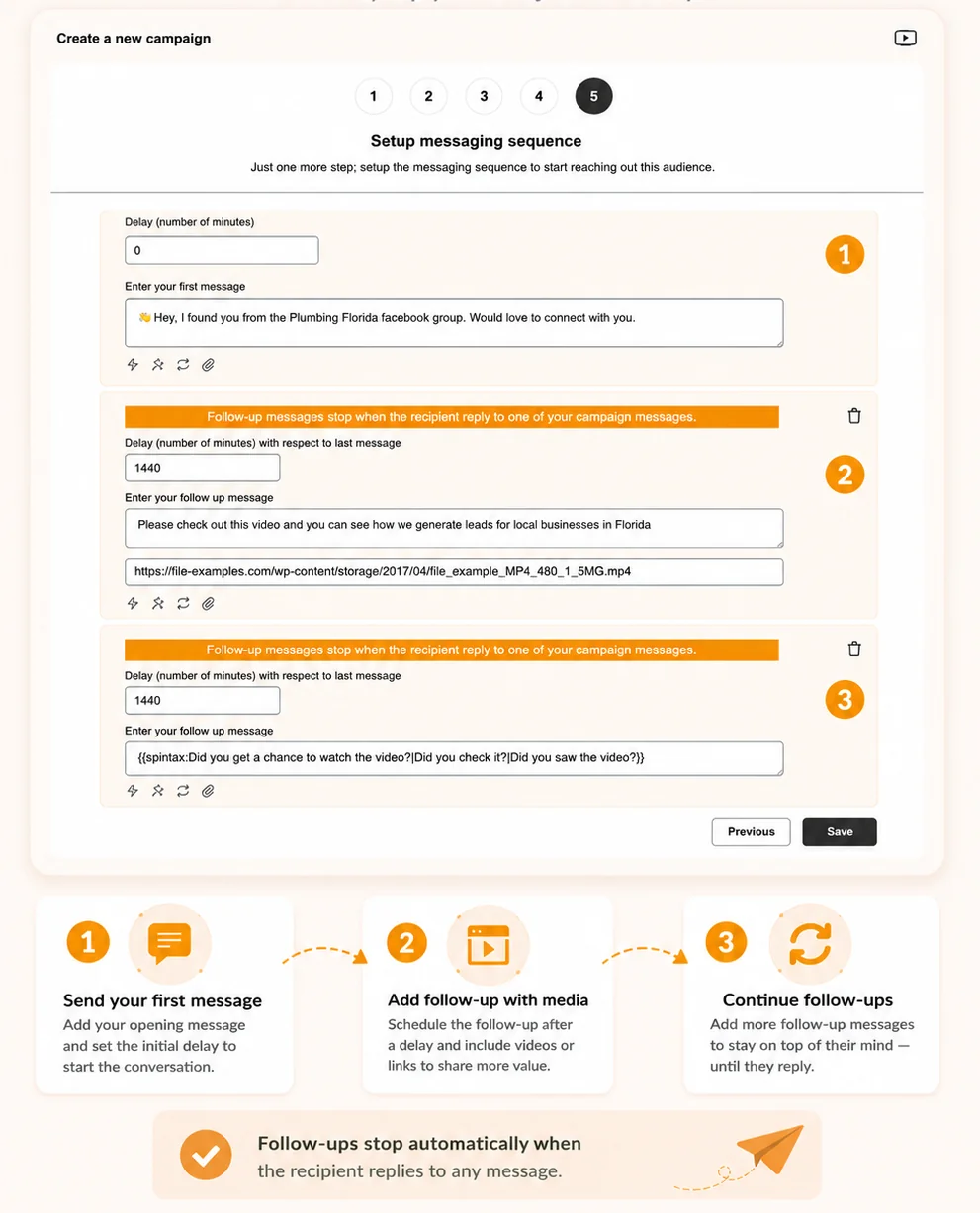
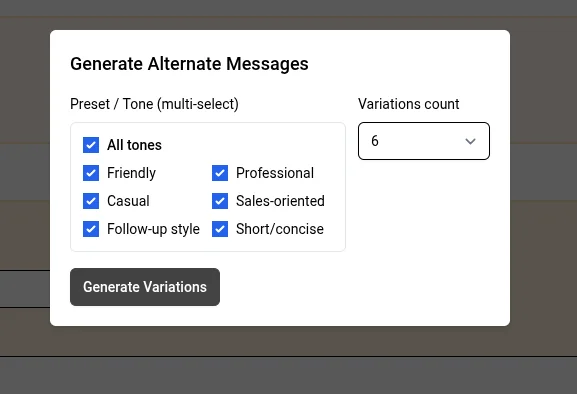
AI drafts and reply suggestions help you scale volume without sounding like a spam bot.
Pay once. Automate Facebook, Instagram & WhatsApp messaging forever. No monthly SaaS bill, just more conversations that turn into clients.
Test DM automation on one account before you scale outreach.
Basic plan
$49/mo
Save $489 vs 12 months at $49/mo ($588/yr)
Most popular, 5 accounts for founders & small teams booking calls from Facebook, Instagram & WhatsApp messaging.
Premium plan
$149/mo
Save $1589 vs 12 months at $149/mo ($1,788/yr)
30 accounts for agencies running client outreach at scale.
Agency Plus
$299/mo
Save $3,089 vs 12 months at $299/mo ($3,588/yr)
Straight answers on scraping, messaging, CSV imports, scheduling, APIs, account safety, and what is included in your one-time payment.
Yes. ReachOwl is built around human-like automation behavior, pacing controls, and platform-aware limits to reduce risk.
You can scale heavily with safe limits in place to protect account health and maintain reply quality over time.
Yes. Lifetime access includes ongoing improvements and major feature updates to the platform.
Basic fits solo users, Advanced is best for growing teams, and Agency is ideal for high-volume client or multi-account operations.
Yes. You can start with the plan that fits your current workflow and move to a higher lifetime tier as your outreach scales.
Lifetime pricing lets early users lock in access at a one-time cost while ReachOwl scales its product and support.
When this lifetime offer closes, new customers will move to standard subscription plans. Existing lifetime purchases keep their access.
Yes. You install the extension, connect your account, and launch campaigns with guided steps—no technical setup required.
Yes. Agencies use ReachOwl for client outreach, with higher tiers supporting more accounts and campaigns.
ReachOwl runs in your local browser session instead of shared cloud infrastructure, which reduces session exposure.
ReachOwl follows platform pacing and limits, but no tool can guarantee outcomes if platform rules change.
Yes. ReachOwl lets you collect Facebook profiles from groups independently of outreach campaigns.
Scraping an audience does not automatically send friend requests or messages. You can review your collected audience and decide when to start your campaign.
Yes. ReachOwl supports importing audiences through CSV files containing Facebook and Instagram profile URLs, so you can create audiences without manually adding every contact.
CSV imports are useful when you already have a prospect list from another platform or data source. You can include additional contact information such as:
Can I use my own CSV columns as dynamic message variables?
CSV import support and dynamic message personalization are separate capabilities. The availability of custom fields as message variables depends on the supported campaign personalization options.
ReachOwl supports Facebook friend-request automation and messaging campaigns.
However, automatically triggering a message immediately after a friend request is accepted is a separate trigger capability. Please confirm the availability of this specific workflow before configuring your campaign.
Yes. ReachOwl supports messaging automation for Facebook and Instagram, as well as WhatsApp messaging.
Supported messaging platforms include:
Facebook, Instagram, and WhatsApp require their respective accounts to be connected and available through the supported browser setup.
Reply handling is an important part of messaging automation. ReachOwl supports messaging sequences and reply-related campaign workflows.
However, the exact behavior for cancelling all remaining scheduled follow-ups after a reply depends on the campaign's supported reply-handling functionality. Check the relevant campaign settings and documentation before relying on automatic cancellation across every campaign type.
ReachOwl supports connecting multiple social media accounts and running separate campaigns.
If you manage multiple Facebook or Instagram accounts, you should consider maintaining a shared prospect list to help organize outreach and avoid unnecessary duplicate contacts.
Automatic cross-account duplicate detection and suppression should not be assumed unless explicitly supported by the relevant feature.
ReachOwl provides API and webhook integrations that allow external applications and automation systems to interact with supported ReachOwl events.
Reply-related events can be useful for:
The exact information available in each webhook payload depends on the event and supported API fields. Verify the availability of complete reply text against the API and webhook documentation.
Keyword Monitor helps you discover relevant social media content based on keywords—posts and conversations relevant to your business, industry, or target audience.
Common use cases include:
The actions available after discovering matching content depend on the specific monitoring workflow. Keyword monitoring should not be confused with automatic commenting or messaging—those require their respective supported automation features.
ReachOwl uses a browser-based automation system through its Chrome extension. Unlike cloud-based platforms, it relies on your connected Chrome browser to execute social media activities.
When Chrome is closed:
Once Chrome is reopened and the extension is active, pending workflows can resume according to their schedules and execution status.
Will all pending messages be sent at once after reopening Chrome?
No. ReachOwl does not intentionally send all pending messages at once simply because the browser was closed. Campaign execution follows the applicable scheduling and queue-processing logic.
Recommended setup: Keep your laptop powered on, maintain an internet connection, and leave Chrome running with the ReachOwl extension active.
Yes. Facebook Post Scheduler is a separate feature from messaging campaigns.
You can schedule Facebook posts for supported destinations, including:
You can also manage schedules for multiple connected Facebook accounts.
Does the scheduler require Chrome to remain open?
Yes. ReachOwl uses the connected Chrome browser and extension to execute scheduled posting. Chrome must remain available for scheduled automation to run.
Does each scheduled post count as a messaging campaign?
No. Facebook Post Scheduler is managed separately from messaging campaigns. Check your subscription details for applicable scheduler usage limits.
Facebook and Instagram apply their own activity restrictions and spam-prevention systems. There is no universal daily limit that guarantees an account will remain unrestricted.
Your account's activity limits can depend on:
Recommended warm-up for new accounts: Gradually build normal account activity over approximately 2–3 weeks before increasing automation.
Best practices: start conservative, increase gradually, maintain normal engagement, avoid identical mass messages, monitor notifications, and follow platform policies.
ReachOwl cannot guarantee that an account will never receive a warning, restriction, or temporary limitation.
Yes. ReachOwl supports connecting and managing multiple social media accounts. You can configure separate Chrome browsers and ReachOwl extension installations on different laptops.
For example:
Each laptop can run its own browser-based automation environment. Make sure each social media account is connected correctly and that the corresponding Chrome browser remains active during scheduled automation. Your subscription's account allowance determines how many social media accounts you can connect.
ReachOwl offers plans with different account and campaign allowances. The Professional Lifetime plan is designed for users who need to manage multiple social media accounts and campaigns.
Check the current pricing page for the exact account allowance, campaign limits, and included features.
Yes. ReachOwl offers a 14-day refund period for eligible purchases.
If ReachOwl does not meet your expectations, contact the support team within the applicable refund period. Please review the applicable refund policy and purchase terms for eligibility requirements and any exclusions.

