
Managing Facebook engagement manually becomes difficult as your audience grows.
Reply to Facebook comments instantly using automation tools that help businesses manage engagement across Facebook ads, Groups, and page posts without manual monitoring. As your audience grows, comments can quickly pile up, making it difficult to respond to every lead on time. Delayed responses often result in missed opportunities, lower conversions, and lost customers. Facebook comment automation helps businesses respond faster, improve engagement, generate more conversations, and automatically turn Facebook comments into private DM leads and real sales opportunities.
If you run Facebook ads, manage Facebook Groups, or publish content regularly on your Facebook page, comments can quickly pile up faster than you can respond. Delayed replies often lead to missed opportunities, lost leads, and lower conversions.
Learning how to automatically Reply to Facebook comments helps businesses respond instantly, improve engagement, and turn comments into real conversations automatically.
With the right Facebook comment automation tool, you can:
- Instantly reply to comments on Facebook ads, groups, and page posts
- Automatically send private DMs after comments
- Increase lead response speed
- Improve Facebook ad ROI
- Scale engagement without hiring extra staff
In this guide, you will learn how to automatically reply to Facebook comments using ReachOwl and how to turn Facebook engagement into booked calls and qualified leads.
Why Automatically Replying to Facebook Comments Matters
Many businesses underestimate the value of Facebook comments.
A comment is not just engagement. It is often a buying signal.
When someone comments on your Facebook ad, group post, or business page, they are actively showing interest in your offer, product, or service. If you respond too late, that lead may already move to a competitor.
Facebook comment automation helps solve this problem by responding instantly.
Faster Replies Increase Conversions
People expect fast responses on social media.
If someone comments on your post asking about pricing, services, or availability, responding within seconds creates momentum and keeps the conversation active.
Automatic Facebook comments replies help you:
- Respond instantly 24/7
- Keep leads engaged
- Increase trust and responsiveness
- Capture opportunities before competitors respond
Improve Facebook Ad ROI
Every comment on your Facebook ad represents paid traffic and interest.
Ignoring comments means wasting advertising budget.
By automatically replying to Facebook comment, businesses can convert more ad engagement into conversations, DMs, calls, and sales.
For example:
- Manual response time: 3–8 hours
- Automated response time: 5–30 seconds
That difference can dramatically impact conversions.
Turn Public Comments Into Private Conversations
Public comments create visibility.
Private DMs create sales conversations.
With comment-to-DM automation, you can automatically move Facebook commenters into private messaging where you can:
- Qualify leads
- Share pricing
- Send booking links
- Answer questions
- Close deals privately
This creates a complete Facebook lead generation workflow.
What Is Facebook Comment Automation?
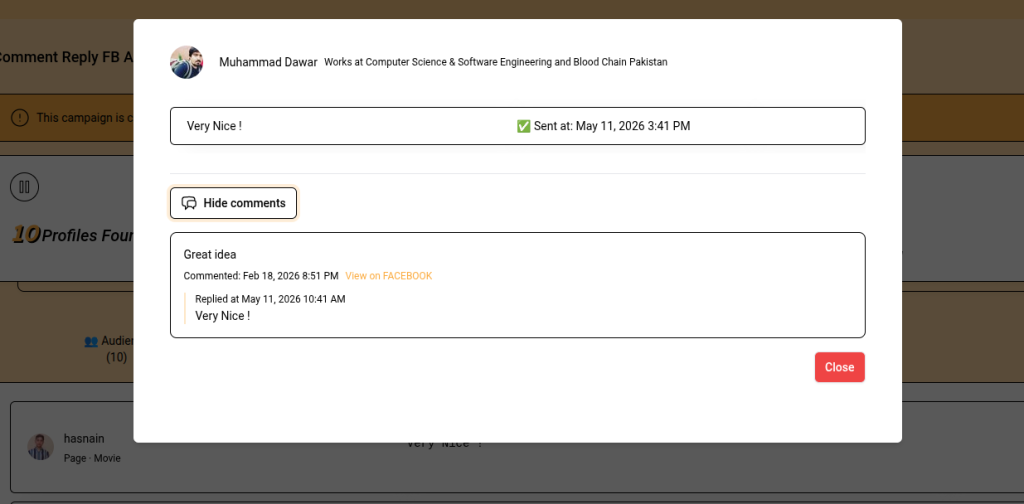
Facebook comment automation is the process of automatically responding to comments on Facebook posts, ads, groups, or pages using automation software.
Instead of manually checking notifications all day, automation tools monitor activity and send replies automatically based on triggers and keywords.
Businesses use Facebook comment automation to:
- Save time
- Improve response speed
- Increase engagement
- Generate leads
- Scale outreach campaigns
Modern automation tools can also trigger DMs after comments, making the process even more powerful.
How ReachOwl Automates Facebook Comment Replies
ReachOwl helps businesses automate Facebook and Instagram engagement safely using browser-based automation.
Unlike cloud bots that use shared servers and risky automation patterns, ReachOwl operates directly inside your browser session using human-like behavior.
Browser-Based Facebook Automation
ReachOwl runs inside your actual Chrome browser session.
This means:
- No shared IP addresses
- No risky cloud bots
- No API abuse
- Human-like activity patterns
- Better account safety
The automation behaves similarly to manual user activity, helping reduce automation risks.
Comment-to-DM Automation
ReachOwl can automatically:
- Detect new Facebook comments
- Reply instantly
- Send automated private DMs
- Trigger follow-up conversations
This allows businesses to move leads from public engagement into private sales conversations automatically.
Example:
Someone comments:
“Interested!”
ReachOwl instantly replies:
“Thanks for your interest! I just sent you a DM with more details.”
At the same time, the system sends a personalized DM with your offer, case study, or booking link.
How to Automatically Reply to Facebook Group Comments
Facebook Groups are powerful for lead generation, networking, and community engagement.
Monitoring multiple groups manually can take hours every day.
Automation makes the process scalable.
Step 1 – Install ReachOwl and Connect Facebook
Install the ReachOwl Chrome extension and log into your Facebook account.
ReachOwl uses your real browser session, so no separate Facebook API setup is required.
After installation:
- Open ReachOwl
- Connect your Facebook account
- Verify the browser session
- Start creating automation campaigns
Step 2 – Create a Facebook Group Comment Campaign
Inside ReachOwl:
- Navigate to Campaigns
- Select Facebook Comment Automation
- Choose Facebook Groups
You can monitor:
- Specific groups
- Multiple groups
- All joined groups
You can also filter posts by keywords to target only relevant conversations.
Example keyword filters:
- looking for
- recommendations
- hiring
- need help
- agency
- automation
This improves targeting and reduces spammy automation.
Step 3 – Write Natural Auto Replies
Your automated replies should feel human and conversational.
Good example:
“Great question! I actually helped several businesses solve this recently. Just sent you a DM with details.”
Bad example:
“Buy my product here!”
Always focus on:
- Adding value
- Starting conversations
- Being helpful
- Sounding natural
Step 4 – Enable Comment-to-DM Automation
Comment replies get attention.
DMs create conversations.
Enable automatic DMs after comment replies inside ReachOwl.
Example DM:
“Hey John, saw your comment in the Facebook Group. I’d love to show you how this works. Here’s a quick case study and booking link.”
This workflow helps convert Facebook engagement into qualified leads automatically.
Step 5 – Configure Safe Automation Limits
Safe automation matters.
Recommended starting limits:
- 20–30 comment replies daily
- 15–25 DMs daily
- Random delays between actions
ReachOwl includes human-like timing and activity limits to help maintain account safety.
Step 6 – Launch and Monitor Performance
Once your campaign is live, ReachOwl automatically:
- Monitors comments
- Sends replies
- Triggers DMs
- Tracks engagement
You can monitor campaign performance directly from the dashboard.
Track metrics like:
- Comments replied
- DMs sent
- Response rates
- Conversations started
- Leads generated
How to Automatically Reply to Facebook Ad Comments
Facebook ad comments are highly valuable because they come from paid traffic and warm audiences.
Fast replies improve ad conversions significantly.
Step 1 – Connect Your Facebook Ads
Inside ReachOwl:
- Open Ad Comment Automation
- Connect your Facebook Ads account
- Select the campaigns you want to monitor
You can automate replies for:
- Lead generation ads
- Video ads
- Conversion campaigns
- Retargeting campaigns
Step 2 – Create Facebook Ad Auto Replies
Your ad replies should encourage conversation.
Good examples:
- “Thanks for your interest! I just sent you more details via DM.”
- “Happy to help. Check your inbox for pricing and setup information.”
- “Just sent you a quick walkthrough and case study.”
Avoid generic or spammy replies.
Step 3 – Trigger DMs From Facebook Ad Comments
This is where the real conversion happens.
Once someone comments on your ad, ReachOwl can instantly:
- Send a DM
- Share pricing
- Deliver a lead magnet
- Send a booking link
- Start qualification conversations
This helps businesses turn Facebook ad engagement into real leads automatically.
Step 4 – Track Facebook Ad Performance
ReachOwl analytics help monitor:
- Comment reply rates
- DM open rates
- Lead response rates
- Demo bookings
- Conversion performance
This data helps optimize your automation campaigns over time.
How to Automatically Reply to Facebook Page Comments
Facebook page posts generate daily engagement from followers, prospects, and customers.
Automatic replies help maintain responsiveness without constant monitoring.
Create a Facebook Page Automation Campaign
Inside ReachOwl:
- Select Facebook Page Automation
- Choose your business page
- Monitor comments automatically
Filter High-Intent Comments
Not every comment needs a reply.
You can trigger automation only when comments contain buying intent keywords like:
- pricing
- interested
- demo
- details
- how much
- available
This improves relevance and prevents over-automation.
Write Personalized Comment Replies
Personalized replies perform much better than generic responses.
Use dynamic variables like:
- First name
- Group name
- Post topic
Example:
“Hey Sarah, thanks for your interest! I just sent you a DM with more information.”
Personalization helps automated replies feel more natural.
Automate DMs After Comments
Once a user comments, ReachOwl can automatically continue the conversation privately.
Example workflow:
- User comments on your Facebook post
- ReachOwl replies instantly
- ReachOwl sends a personalized DM
- Lead enters your sales conversation pipeline
This creates a scalable Facebook lead generation system.
Benefits of Facebook Comment Automation
Instant Engagement
Respond to leads within seconds instead of hours.
Better Facebook Ad ROI
Convert more paid traffic into conversations and sales.
Scale Facebook Outreach
Manage engagement across multiple groups, pages, and ads simultaneously.
Save Time
Reduce hours spent manually checking notifications and replying to comments.
Generate More Leads
Turn Facebook comments into automated DM conversations and booked calls.
Best Practices for Facebook Comment Automation
Use Human-Like Delays
Avoid aggressive automation behavior.
Use randomized delays between actions to mimic natural user activity.
Personalize Every Reply
Generic replies reduce engagement.
Use names, post context, and conversational messaging.
Start Slowly
Begin with lower activity limits and gradually increase over time.
This helps build trust with Facebook’s systems.
Combine Automation With Manual Engagement
Automation handles repetitive work.
Manual engagement should still be used for:
- Complex questions
- VIP leads
- Personalized sales conversations
A hybrid approach works best.
Test Different Reply Styles
Experiment with:
- Short vs long replies
- Questions vs statements
- Soft CTAs vs direct CTAs
- Educational vs sales-focused messaging
Optimization improves response rates over time.
Common Facebook Comment Automation Mistakes
Over-Automating Everything
Not every comment requires automation.
Focus only on relevant, high-intent engagement.
Using Spammy Messages
Avoid replies like:
- “DM me”
- “Click here”
- “Buy now”
Always provide context and value first.
Ignoring DM Follow-Ups
Comment replies are only the beginning.
Real conversions usually happen inside DMs.
Scaling Too Aggressively
Increasing automation too quickly can trigger account restrictions.
Scale gradually and safely.
Why Businesses Use ReachOwl for Facebook Comment Automation
Businesses use ReachOwl because it combines:
- Facebook comment automation
- Instagram automation
- DM automation
- Browser-based safety
- Human-like automation
- Lead generation workflows
Whether you are an agency, coach, appointment setter, marketer, or business owner, ReachOwl helps automate engagement while keeping conversations natural.
Conclusion
Learning how to automatically reply to Facebook comments can dramatically improve your engagement, lead generation, and conversion rates.
Instead of manually monitoring comments all day, automation helps businesses:
- Reply instantly
- Capture more leads
- Improve Facebook ad performance
- Scale outreach campaigns
- Turn comments into private conversations automatically
ReachOwl makes Facebook comment automation simple with browser-based workflows, comment-to-DM automation, and human-like activity patterns designed for safer automation.
If you want to scale Facebook engagement without spending hours replying manually, ReachOwl can help automate the entire process.
You can also join the ReachOwl Facebook Community to connect with marketers, agencies, and automation users, share strategies, ask questions, and learn advanced Facebook and Instagram outreach techniques.
Frequently Asked Questions
Is Facebook comment automation safe?
ReachOwl uses human-like delays and browser-based automation to reduce risks compared to cloud-based bots. Using secondary accounts is still recommended for additional safety.
Can I customize Facebook auto replies?
Yes. ReachOwl supports personalized replies, keyword triggers, dynamic variables, and different automation workflows.
Does ReachOwl support Instagram automation too?
Yes. ReachOwl also supports Instagram outreach automation, DM automation, and comment-to-DM workflows.
How many Facebook comments can I auto reply to daily?
Most accounts should start with 20–30 daily replies and gradually increase activity over time.
Do I need proxies or anti-detect browsers?
No. ReachOwl runs directly inside your Chrome browser using your actual Facebook session.
Can I stop automation anytime?
Yes. Campaigns can be paused or stopped anytime directly from the ReachOwl dashboard.